
New Micro-Internships are posted daily, and and they are often filled within a few days (if not faster). Log into Parker Dewey regularly (i.e. every day or two) to see what's new! If you see a project that interests you, don't wait! Apply right away! If not, the project may not be available when you come back.
In the following section you will find information about:
- How to view and filter Micro-Internships
- How to view specific project details
- How to apply for a Micro-Internship
- How to contact an employer
- How to retract an application
- How to revise an application submission
View Micro-Internships
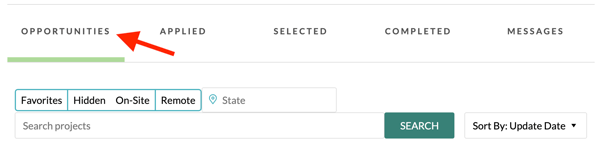
- Favorites: Shows all projects that you have "Starred."
- Hidden: Shows all projects where you clicked the Hide button.
- On-Site: Shows all projects that are conducted on-site. Be sure to select your target State to filter this list, and do not apply for a project if you are unable to complete it in-person.
- Remote: Shows all projects that can be conducted remotely.
- State: Type in your target state to see all projects from companies located in that state.
- Search Bar: Use the search bar to search Micro-Internship titles and descriptions for specific words or phrases that are of interest to you.
Tip for Success: Make sure you have filled out your Education section and Affiliations as completely as possible. If you fail to do so, you may not see all Micro-Internship opportunities that are available to you. You can update your list of Affiliations by clicking on Hi [Your Name] in the upper right corner and then selecting Profile.
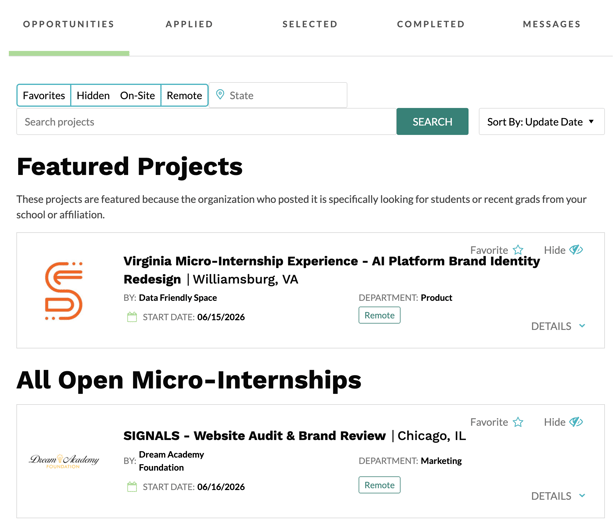
Micro-Internship Details
Click on DETAILS to see more information about that project.
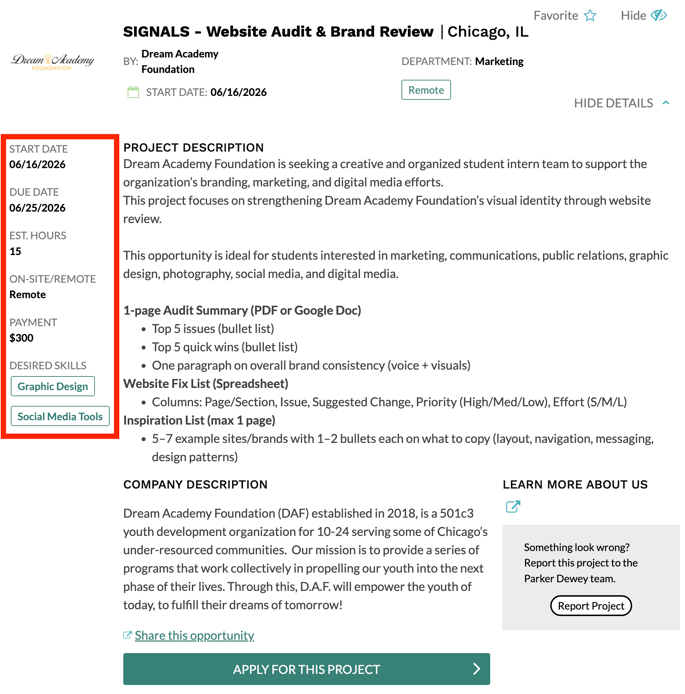
When reviewing project details, be sure to note the following:
- Start Date and Due Date: Although this may change, this is the approximate timeline for completing the project. If you are not available during this time, do not apply for this project.
- Estimated Hours: This is the approximate amount of time that you can expect to complete the project. There is no time-keeping with these projects; if you complete the project in more or less time than what is listed, your payment does not change.
- On-Site/Remote: This is the expected location for the project. If you are applying for an on-site project and would not be able to complete the project on-site, do not apply.
- Payment: If you are selected for this project, this is the amount you will receive from Parker Dewey once the project is completed. Again, this is a fixed-fee; if it takes you more or less time than what is stated in the "Estimated Hours," your payment does not change.
Tip for Success: If you’re not sure what types of projects might be a good fit for you, use the Agile Work Profiler to better understand how your strengths and skills might align with different opportunities. This is a free resource developed by The DeBruce Foundation to help job seekers expand their career pathways.
Apply for a Micro-Internship
To apply for a project, complete the short-answer questions in the project application. All projects will have at least one, short-answer application question; many have more.
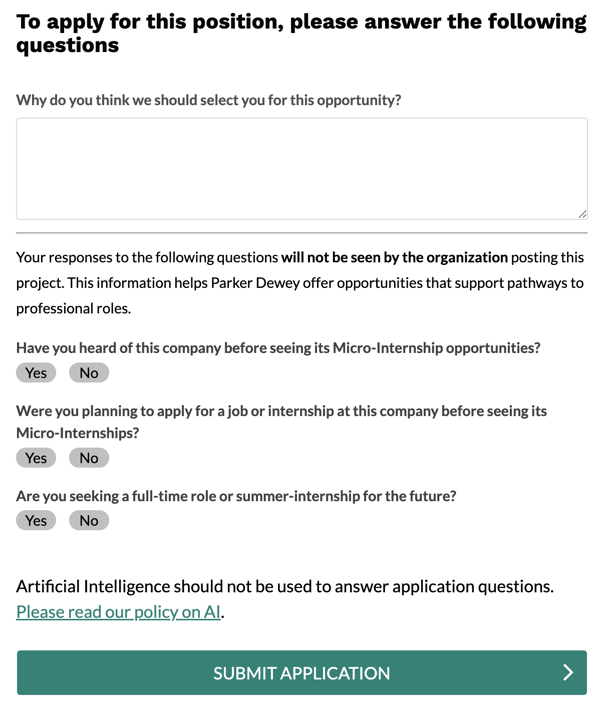
The application questions are extremely important! Not only are your responses front-and-center when a company is reviewing your application, but companies have the option to use them as both the application AND the interview. Accordingly, your responses to these questions are the biggest (and sometimes only) way that a company chooses you over another applicant.
In your application responses, be sure to:
- Be specific. Don't just copy/paste the same responses to each question.
- Edit your work. Typos will stand out.
- Back up what you say with work samples. If you do not have documents in your Parker Dewey profile, be sure to add them as soon as possible.
For additional tips on how to answer short-answer application questions, refer to this article. To see sample responses from past Micro-Interns, check out this resource.
Using AI: As noted in the screenshot above, Artificial Intelligence (AI) should not be used to answer application questions. For more information about when it is appropriate to use AI for Micro-Internships, consult our Artificial Intelligence Policy.
When you have completed your application questions, click SUBMIT APPLICATION.
ClickOPPORTUNITIES to continue applying to available Micro-Internships.
Contact an Employer
Project supervisors can reach out to you once you have submitted an application to their project. There is no way for applicants to reach out to companies once you have applied unless they reach out to you. In fact, companies don't want you to reach out to them. These are busy professionals with a lot to do...they'll reach out to you if they want to connect.
Companies who want to reach out to you before selecting you for a Micro-Internship can use the Messages feature within the Parker Dewey platform. They may use this feature to request additional information from you about your relevant experience or to set up an interview.

If a company sends you a message, you will receive an email to whatever email address you used to create your Parker Dewey account.
No company should ever request your Social Security Number (SSN), Individual Taxpayer Identification Number (ITIN), address, or any other details necessary to pay you for your Micro-Internship. Parker Dewey is the employer of record for all Micro-Internships, meaning that if you are selected for a Micro-Internship, your pay will be processed by Parker Dewey.
If someone other than Parker Dewey asks you for these details or any other personal information, do not share them, and contact Parker Dewey support immediately at support@parkerdewey.com.
Retract an Application
If you have applied to a Micro-Internship and no longer wish to be considered for that opportunity, you must retract your application from consideration. This means that your application will no longer be visible to the employer and they will not have any record that you have applied to their project. To do this:
Log into Parker Dewey.
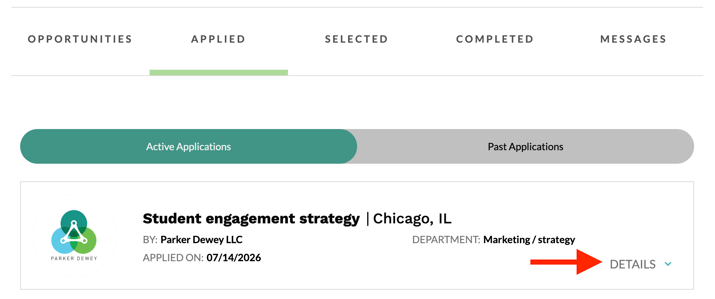
- Click on the Applied tab in your dashboard.
- Select the project from the list of your Active or Past Applications.
Note: "Active" applications are those where you are still under consideration. "Past" Applications are projects where the employer has hired all of the Micro-Interns it wishes to work with at this time and you are not currently under consideration.
-
Select Retract Application.
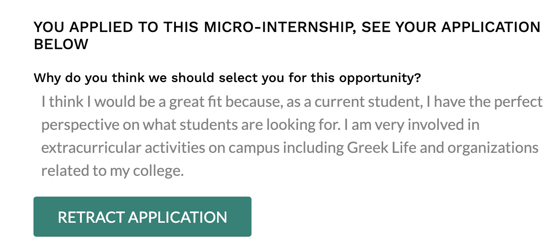
This step is not reversible. Do not retract an application unless you are certain that you wish to completely remove your application from consideration.
Revise an Application Submission
If you notice a typo that you wish to correct or otherwise wish to revise an application that has already been submitted, you will need to retract and resubmit your application.
Before you do this, it is recommended that you copy and paste your responses into a separate document so that you do not lose the answers you previously submitted.
When you have saved your original answers to your application questions, retract your application.
Once you have retracted your application you will be able to reapply for that opportunity.