
Congratulations on completing your Parker Dewey Micro-Internship! We are here to help you close this valuable experience and get ready for a new one! This page includes the following information:
- What do I do when I've completed my project?
- How do I mark my project as completed in Parker Dewey?
- How and when do I get paid?
- How does feedback work?
What To Do When You've Completed Your Project
When you think you've completed your project, be sure to do the following:
- Carefully check your work. Remember this is a professional project that can have a real impact on someone's business. Tools like Grammarly can help you check your work.
- Submit your final project to your project supervisor. Depending on your project, be sure to send it to them in whatever format(s) they wish (e.g. ppt AND pdf).
- Mark your project as completed in Parker Dewey. This will inform the Parker Dewey Team that you have completed your project, and we will confirm completion with your project supervisor. Once your employer confirms, your payment will be processed in the next payroll cycle.
- Complete the Post Micro-Internship Checklist. These steps will ensure that you are taking full advantage of the Micro-Internship experience and are ready to showcase this experience for your next opportunity.
The Post Micro-Internship Checklist contains important steps such as how to review the feedback you receive from your Micro-Internship Supervisor and how to update your Resume and LinkedIn profile to showcase your Micro-Internship.
How Do I Mark My Project as Completed in Parker Dewey
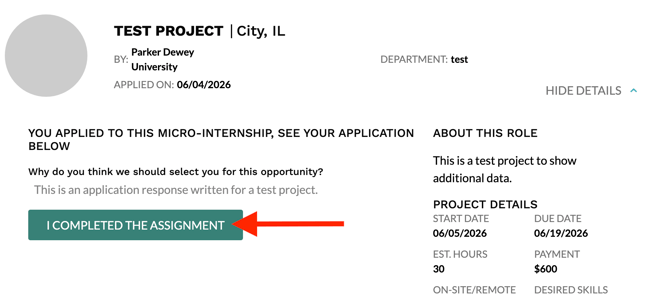
Navigate to the HIRED tab, then select the DETAILS section to expand the project. From there, select the button that says I COMPLETED THE ASSIGNMENT as shown in the screenshot below.
How Payment Works
Once both you and your employer have marked your project as complete in your dashboards, you will be paid by Parker Dewey.
Parker Dewey uses a secure payroll system called Tipalti. The first time you have been selected for a Parker Dewey opportunity, you will receive a unique link to create your account in Tipalti. You only have to complete this process once. If your information changes, you can log into Tipalti and update anything you wish.
Payroll is processed at the end of each month and released at the beginning of the following month. If the last day of the month falls on a weekend, payroll will be processed the following Monday. You will receive an email from the Parker Dewey Accounting Team when your payment has been processed.
IMPORTANT: If anyone other than Parker Dewey requests your Social Security Number (SSN) or individual taxpayer identification (ITIN), your address or any other sensitive information: immediately contact support@parkerdewey.com with details of the interaction. Your project supervisor should never request any of the above information.
If you have questions about payment, check out our Payment FAQ's or reach out to the Parker Dewey Support Team.
How Feedback Works
Once your project supervisor has marked your project as completed, you'll have the ability to take a short (<5 minute) survey. Each month, those who take the survey are entered into a drawing to win a $10 Amazon Gift Card!
To complete the survey, log into Parker Dewey and select COMPLETED. Click on the Complete Survey button to complete the survey. It will take between 5 and 10 minutes to complete this survey.
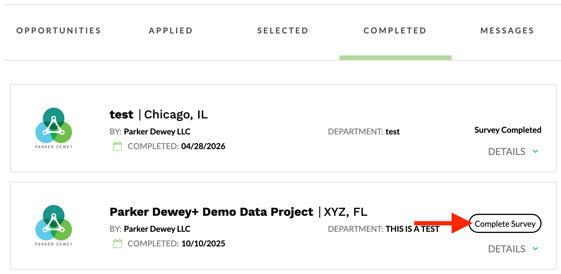
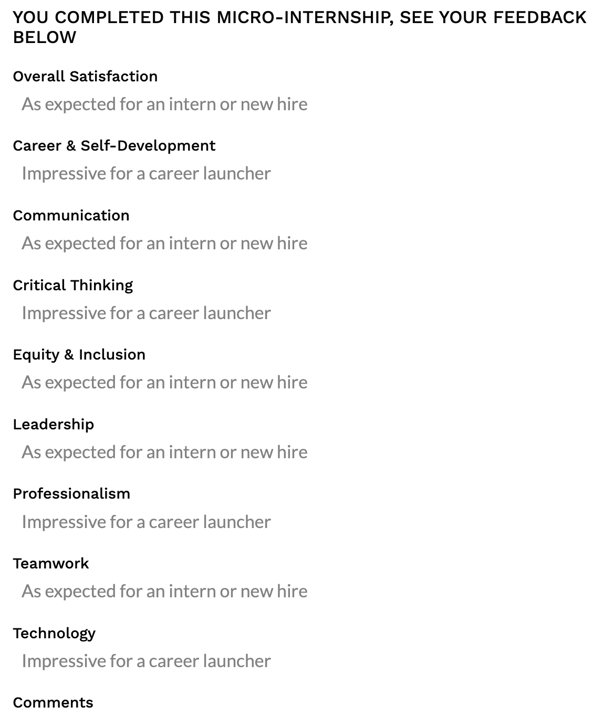
Your project supervisor can also give you feedback. You can see this feedback by logging into your Parker Dewey profile and selecting the COMPLETED tab. Then select DETAILS next to the project that you completed.
If you have received feedback you will see something similar to the screenshot below.
This feedback will not be shared with any companies using the Parker Dewey platform.